





Introduction
Introduction

Nvidia launched the 900 series this September, as usual starting with their “flagship” GTX 980 and the slightly cut down GTX 970. With the 980 priced at $549 and the GTX 970 priced at $329 and with both cards featuring sub 200W TDPs, the VGA market was drastically changed in a single day. Although Nvidia has been cutting down the power consumptions of their cards continuously since the infamous GTX 480 BBQ edition, Maxwell has really redefined the power to performance ratio at a time where AMD is concurrently struggling to cool their R9-290x cards.
Nvidia gave us a taste of Maxwell back in February of last year when they launched the awesome 750 Ti. The reference design of the 750 Ti features a ridiculous TDP of 55W and doesn’t even require a single 6 pin. Although it wasn’t part of the 900 series and wasn’t the flagship card, it got enthusiasts craving for more Maxwell because it performed so well (at such low power) for such a low end card. Now with the 900 series Nvidia has continued with their low power trend.

Despite the impressive power consumption numbers, neither GPU is lacking in processing power. While our GTX 980, GTX960 SSC, and Titan X reviews coming in the near future, we were thoroughly impressed by the performance from it’s little brother, the GTX 970. EVGA provided our sample today, their EVGA GeForce GTX 970 SSC ACX 2.0+. As usual, EVGA is currently offering no less than eight different SKUs ranging from $329.99 to $389.99.
Unlike the GTX 980, Nvidia didn’t initially offer a reference board with their classic cooler that the GTX 980 sports. Currently Nvidia only offers what some may consider a reference design with classic cooler exclusively through Best Buy for $379.99 – however it’s important to point out that the PCB is actually more similar to that of a GTX 980, even being compatible with GTX 980 water blocks. Since no reference design was made available, GPU vendors were given the ability to choose which PCB they wanted to use. While this helped Nvidia’s partners clear out old PCBs, it rubbed some people the wrong way, particularly those that like to water cool. With no reference design, end users had to be very careful when choosing which card they were going to go with if they wanted to water cool. Manufacturers used PCBs from the very dated 660 Ti all the way to the brand new GTX 980. While EVGA is using their own custom GTX 760 solution for their 970s, it’s very similar for the entire lineup, which allows water cooling manufacturers to create a single block for all cards. Luckily this meant that many of the old waterblock designs were later found to be compatible with various 970 designs.
Below you will find tables for all of the higher end AMD & Nvidia GPUs from the past couple of years. Keep in mind that all cores are not created equal! CUDA Cores =/= Stream Processors performance wise, even Kepler Cores =/= Maxwell Cores. Let’s start with AMD:

As with the Kepler GTX 680 and 780 generation Nvidia decided to save the highest end Maxwell version for later, first launching with the Titan X before trickling down to unnamed GTX models later. The GTX970 is therefore not based on the high end GM200 core but the “midrange” GM204 chip. This is the same chip as in the GTX 980 but with some cores disabled.

Now that you’re caught up on the technical part of the GPU, lets take a look at this specific model!
The EVGA 970 SSC ACX2.0+
The EVGA 970 SSC ACX2.0+
As the name suggests the EVGA GeForce GTX 970 SSC ACX 2.0+ comes with EVGA’s latest revision to their ACX line of coolers. EVGA first introduced the ACX line back in May of 2013 with the launch of their 780 lineup. The latest revision promises even quieter and more power efficient cooling than its predecessor. We saw EVGA showing off a demo of this latest revision at CES and we’re very excited to put it to the test. Thanks to Nvidia’s extremely power efficient architecture EVGA was able to design a cooler that doesn’t even have to turn on unless under heavy stress! Coined “dBi” or dB Noise Inverter, it turns off the fans of the cooler if the card is below 60C, which with no additional OC, we found is actually most of the time.

EVGA put these marketing slides and videos together for their new ACX2.0 coolers, later on in the review we’ll discuss our findings.

(Courtesy of EVGA) New Features:
- dBi – dB Noise Inverter turns fans off below 60C, generating 0dB of noise during idle!
- QSD BIOS – Quick Switch Dual BIOS allow you to switch to secondary BIOS with the flick of a switch.
- MMCP – Memory MOSFET Cooling Plate reduces MOSFET temps by 47% and Memory by 14%.
- OPT – Optimized Power Target offers 33% more power over reference.
- SHP – Straight Heat Pipes reduce GPU temperature by almost 5C!
Marketing aside, lets get this GPU unboxed:
The 970 SSC comes in now standard EVGA packaging.

Inside the box you’ll find the usual suspects of goodies from EVGA.
- A large poster
- Several stickers
- Case badge
- Driver disk
- Instructional Manual
- Additional marketing handouts
- DVI->VGA Adapter
- Dual Molex -> 6 pin power adapter
- Dual 6 pin -> 8 pin power adapter
Nothing particularly exciting but still more than most vendors send.

While at this point we are well aware that the fans will not turn on before the GPU hits 60C, we definitely don’t blame EVGA for wanting to throw this in the box for those that may not be aware of this feature. We can only imagine someone who’s building their computer for the the first time freaking out because their fans aren’t turning on. Take note others vendors, small handouts like this can save you a lot of trouble in the future.

Case badges are less popular these days than they were five years ago but EVGA still manages to make a good looking badge. Unlike the flimsy ones you may receive from Intel or AMD, these badges are rigid and feel heavy duty.

Standard DVI->VGA, Dual Molex -> 6 pin, and Dual 6 pin -> 8 pin. The latter maybe confusing because most 970s only have 2 6 pins, but this higher powered card has an 8 pin and a 6pin.

Although it’s nice to see that the cables are black, we would have much preferred to see them individually sleeved like the PSU cable sets EVGA offers. These glossy, and sort of sticky, cables are not our favorite.

Finally, the card itself! We do miss the protective foam that EVGA used to ship their GPUs in.

The molded plastic did its job and the GPU arrived in perfect condition with plenty of additional plastic protection on the card itself. Read on for a look at EVGA’s ACX2.0+ cooler!
Up Close & Personal
Up Close & Personal

Once the plastic was removed the elegance of the card really shone. The shroud has a textured matte black finish while the fans are a slightly shinier black. Despite this photo, the two blue accents on either side do match each other (although they don’t match EVGA’s normal black/red theme).

Lots of reviewers were complaining that the SSC didn’t come with a backplate. EVGA offers so many different models at different price points for a reason. If a backplate is a deal breaker for you then you can simple drop another $30 and get the FTW version that is essentially otherwise the same but for a slightly higher core clock. At least EVGA offers backplates at all, unlike some GPU vendors.

We aren’t sure if Nvidia took customer feedback into account but they’re finally hopping on the display port bandwagon and we’re huge fans. For years AMD has been the king when it comes to display output, starting with their ATi 5870 Eyefinity Edition GPU that had no less than six mini Display Port outputs. Sadly, despite that GPU coming out six years ago, AMD seems to be going backwards, now only offering one DVI-D, one DVI-I, one HDMI, and one Display Port. You may be thinking, “well that sounds like a lot of different outputs, why is that bad?” Now that 4K/UHD displays are more common, bandwidth of a display output is actually a deciding factor. You can’t simply plug an HDMI 1.4 or a DVI cable into a 4K monitor and get the maximum resolution or Hz that the monitor is rated for. Every monitor that has a greater resolution than 1920×1200 at 60Hz requires more bandwidth than DVI-I can offer. DVI-D can support resolutions up to 2560×1600 at 60Hz but falls short when it comes to faster displays or UHD displays. HDMI 1.4, the most commonly HDMI spec before the GTX900 series would allow you to display the entire 4K resolution but you would be limited to 30Hz, which we found to be a lot more obnoxious than one might think.
Luckily, Nvidia has taken all of this into account and now supplies us with probably the best configuration we can possibly hope for. While we personally don’t use DVI or HDMI and wish GPU vendors would only use a bunch of Display Ports, we understand that a large majority of users still use DVI and/or HDMI and don’t want to have to buy adapters in order to use their new GPU. Nvidia Surround is only capable of working with three monitors though so for the time being three Display Port outputs is plenty. It’s also worth clarifying that point – games can be played across three screens, but Nvidia drivers only output to four per card, meaning that you shouldn’t assume that 5 output options means they can all be used at the same time.

Engraved in the corner is some text that “ACX 2.0”. When we saw we did a double take at the box and made sure that we indeed had the 2.0+ model, and realized the box also says 2.0! Luckily we checked the part number online and found EVGA’s description that says we do indeed have right GPU with ACX 2.0+. While not a big deal, it might be something for EVGA to follow up with.

Overall, EVGA did really well with designing the ACX series of coolers. They’re simple, sleek, and look really good in a case.

This will be your view when the GPU is resting in the motherboard, assuming you have a standard ATX case. For cable management, having the power connectors in the middle of the PCB isn’t our favorite, but it’s not end of the world.

Lastly, at the end of the cooler there’s some orange text that reads “SSC” and glows when the card is turned on. Read on as we remove the cooler and expose the PCB!
Removing the Stock Cooler
Removing the Stock Cooler

To remove the ACX cooler all we had to do was have a phillips head screwdriver and remove the four screws around the core, couldn’t be simpler than that!

Upon inspection, we were incredibly impressed with the amount of TIM EVGA has used with their GPUs. GPU vendors have built up a reputation of putting an obnoxious amount of TIM on the GPU cores that is a huge mess when you take the two apart. However, EVGA did great. Maybe a little more than the average user may apply, but compared to their competition, this is the best stock TIM spread we’ve seen!

Keep up the great work EVGA! For those that haven’t taken apart their own GPU and have no idea what we’re talking about, check out this photo of the TIM job from a competing GPU vendor.

A complete mess… no wonder it was overheating!
Back to EVGA… while the core is directly cooled by the main heatsink the rest of the board components are shielded by a brushed aluminum style heatsink plate:

The metal plate cools the VRMs & memory chips and it looks beautiful! Granted, we are pretty partial to the brushed metal look, but it’s nice to see a manufacturer go the extra mile and make sure all aspects of the card look great.

It also has the added bonus of making the card more friendly to use with after market AIO coolers and universal water blocks.

Removing the cooling plate takes a little more work than the ACX cooler due to the relatively large amount of screws that are involved, but it’s still nothing more than whipping out your phillips head screw driver.

We checked the thermal pads to ensure good contact was being made, which it was.

Here we can see also now see the VRM phases – 6 on the left side of the card for the core, and 2 on the right side for the memory.
Overall, the GTX 970 ACX2.0+ is a great looking card. Considering how relatively short the lifespan of ACX has been, EVGA have developed it into a great looking cooler that performs great!
Now let’s see how well the card performs!
Test Setup
Test Setup Configuration

For our setup we used EVGA’s Stinger Z97 WiFi board along with Intel’s flagship CPU, the 4790k with an impressive OC of 4.8Ghz.
We will running tests both at 1920 x 1080 (1080p) & 3840 x 2160 (UHD or 4k) using an Acer B286HK monitor. Despite the high overclock there may be occasions at 1080p where the CPU may limit performance and so we show total CPU load also. Bear in mind that poorly threaded games that do not utilize multiple cores well may not read 100% across all cores despite effectively throttling.
We use HWiNFO to record all of our data.

As you can see from this table, the SSC comes ready to go with a heavy overclock out of the box. With the core sitting at 1190Mhz and the boost clock at no less than 1342Mhz. You can find this particular card on sale for $349.99 from EVGA.
Below you can find all the different GTX 970s that EVGA currently offer:

The SSC therefore seems like a bargain if you don’t mind the lack of backplate!
Futuremark Benches
Futuremark Benchmarks
"Futuremark creates benchmarks that enable people to measure, understand and manage computer hardware performance. Our talented team creates the industry's most authoritative and widely used performance tests for desktop computers, notebooks, tablets, smart phones and browsers."
Since 1997 Futuremark has been pumping out a variety of benchmarks that can used to test nearly every aspect of your PC. They have kindly provided us with the software necessary to kickoff our GPU reviews!
3DMark11
While 3DMark11 isn’t the newest benchmark around it’s a classic that has been used for ages and we figured we may as well bring you the numbers! We tested on the “Extreme” preset, no other modifications were done. This benchmark was interesting because it was the only one that the GTX 970 ACX and GTX 780 HOF traded blows on.
While 3DMark11 isn’t the newest benchmark around it’s a classic that has been used for ages and we figured we may as well bring you the numbers! We tested on the “Extreme” preset, no other modifications were done. This benchmark was interesting because it was the only benchmark that the GTX 970 ACX and GTX 780 HOF traded blows on.
For the most part we expected the GTX 970 and GTX 780 to be pretty neck and neck. Luckily EVGA has the 970 SSC clocked high and it’s able to beat out the previous gen. Below you can see a graph that details the GPU usage, max CPU thread usage, and the FPS during the benchmark. The drops are the loading screens between the individual benchmarks that make up 3DMark11.

3DMark Vantage
The next benchmark is the infamous 3DMark Vantage. It’s our oldest benchmark today but alongside 3DMark11, it’s an instant classic that we wanted to run for everyone.
Unlike 3DMark11 however, the GTX 780 HOF managed to overtake the GTX 970 ACX. Given the age of these two benchmarks though we aren’t basing our review off of the scores seen here. Again, below, is the Usage/FPS report.

Fire Strike Ultra
Getting into the more modern benchmarks from the guys at Futuremark, we have their latest one next, Fire Strike Ultra. Similar to the ever popular Fire strike and Fire Strike Extreme, Ultra turns it up to 11 and runs at 3840×2160.
Compared to the first two older benchmarks, Fire Strike is one of the best benchmarks for measuring performance numbers in a controlled manner. As you can see the GTX 970 pulls ahead of the competition, except for the dual GPU Titan-Z of course. It even manages to best the highly overclocked GTX 780 HOF.
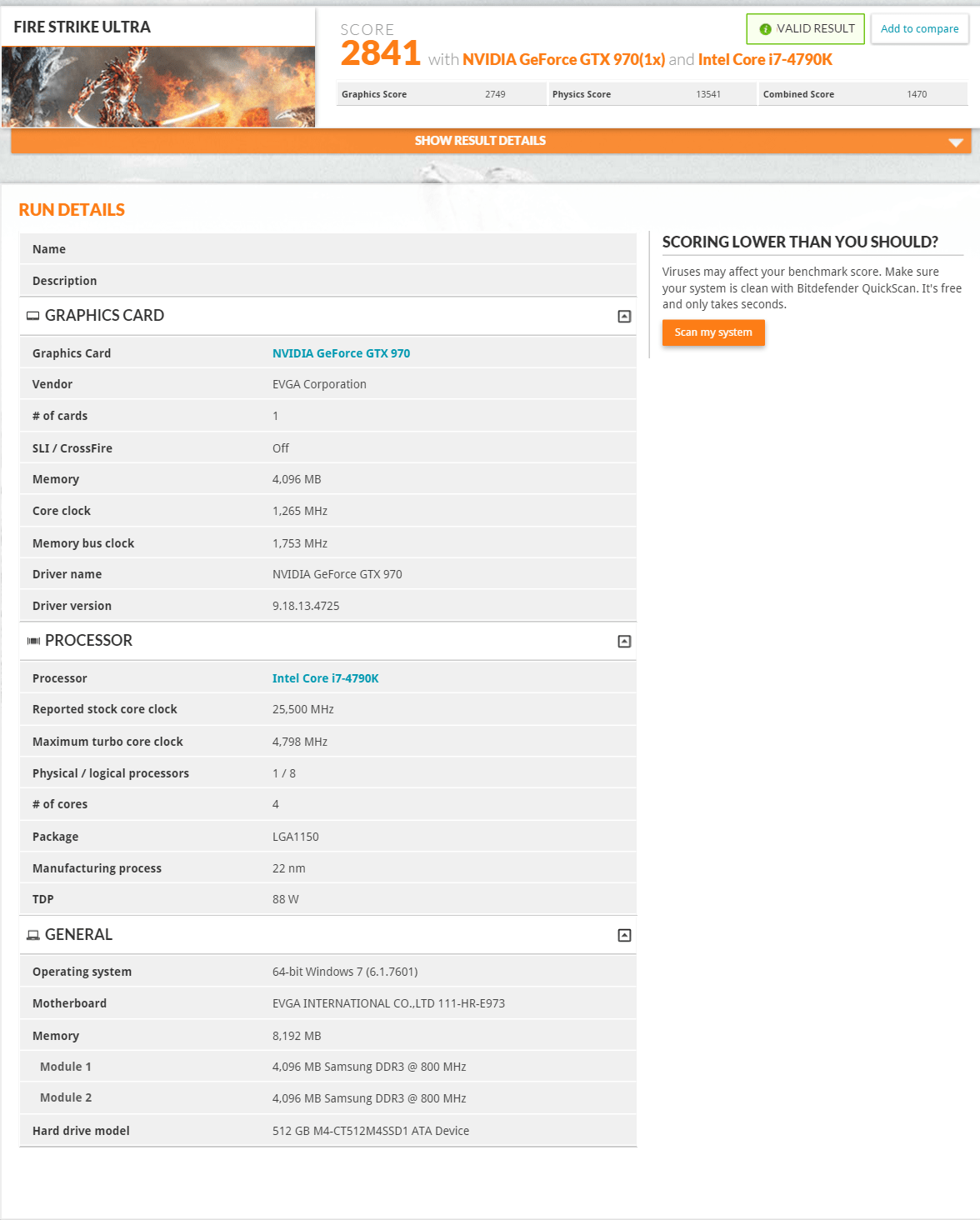
Below you can see the Usage/FPS report. The drops are again transitions in the benchmark to different tests.

Fire Strike Extreme
Fire Strike Extreme is next, instead of running at 3840×2160 like Ultra, it runs at a resolution of 2560×1440.
Just like with Fire Strike Ultra, the GTX 970 pulls ahead of the competition.

Usage/FPS Report

Sky Diver
Sky Diver was also introduced recently but Futuremark recommends it mostly for testing laptops and mid-range PCs hence frame rates with good GPUs will be high! Here are the numbers for your reference though.
And the Usage/FPS report.

Cloud Gate
Similar to Sky Diver, Cloud gate is meant for notebooks and home PCs. Numbers for your reference:
Usage/FPS Report

While we ran most of the benchmarks included in the 3DMark package, the Fire Strike series are the most accurate for testing high end GPUs. The scores represented there will provide users with the most accurate measurements. The rest of the benchmarks are for your reference only if you want to compare against your own hardware, systems, or mobile devices.
As the first benchmarks we ran, we were instantly impressed by the GTX 970. We had expected it to be on par or just above the GTX 780 HOF but even at the base clock speeds that EVGA gave us, it was beating out the overclocked 780!
Read on for Heaven & Valley benchmarks!
Heaven & Valley
Heaven & Valley
Another benchmark that needs no introduction, both Heaven and Valley are known for the beautiful “journeys” that they take you on. Of the two, Valley is the more recent benchmark, however neither have a preset that allows it to run at 4K and we had to set the resolution manually.
Unigine Valley
First we set it to the highest default settings, Extreme HD, which runs at 1920×1080. Unlike with the Fire Strike series, the GTX 780 HOF has managed to beat out the GTX 970 SSC here.
See usage/FPS report below

Next we turned the resolution up to 3840×2160 and left all other settings the same. Here we see that although the GTX 780 HOF is still ahead, the gap is closing, this could be due to perhaps the extra 1GB of memory on the GTX 970.
The Usage/FPS report is where things get interesting though. As you can see in the previous report, CPU usage is much much higher compared to the one for the 4K run. We want to emphasize that no other settings besides resolution were changed here.
1080p has been the go-to resolution for so long that massive CPU throttling was a common concern. With resolutions increasing at such an intense pace we don’t think CPU bottlenecks are going to be the major problem anymore until GPUs catch up.
To give it some perspective, 1080p launched in 2005 on select TVs and monitors and is still the most common resolution used today, ten years later! The first mainstream 4K/UHD monitors launched during the summer of 2013 for over $3,000 USD. The first 5K monitor launched December 2014, around a year and a half after 4K. Although 5K may not seem like a big jump over 4K, with over 14 million pixels it towers over the 4K’s 8 million pixels. It doesn’t stop there either, 8K TVs with a monster resolution of 7680 x 4320 have already been shown by some manufacturers. The resolution wars are upon us and considering how fast Nvidia is continuously putting out new technologies compared to the CPU manufacturers, that’s probably a good thing.

Unigine Heaven
First up we ran Heaven at the highest preset available, Extreme.
Usage/FPS Report

Next we turned the resolution up to 3840×2160 and kept all the other settings the same.
As with Valley, CPU usage significantly drops when the resolution was upped.

Read on for Folding@Home Benchmarks!
Folding@Home
Folding@Home
For those that don’t know what Folding@Home or F@H is:
“Proteins are biology’s workhorses- its “nanomachines.” Proteins help your body break down food into energy, regulate your moods, and fight disease. Before proteins can carry out these important functions, they assemble themselves, or “fold.” While protein folding is critical and fundamental to virtually all of biology much of the process remains a mystery.
When proteins do not fold correctly (misfolding), there can be serious health consequences, including many well known diseases, such as Alzheimer’s, Mad Cow (BSE), CJD, ALS, AIDS, Huntington’s, Parkinson’s disease, and many cancers.
If we better understand protein misfolding we can design drugs and therapies to combat these illnesses.” – Stanford University
The F@H program has been around for several years now and uses your spare computing power for good! It also double functions as a good program to heat the room with hardware instead of your central heating system. We highly recommend anyone who’s got a bunch of spare hardware to check out the software and join a team to compete with people all around the world!
Luckily for us, GPUs lately have gotten a huge increase in their PPD or Points Per Day. See below for the average PPDs we were able to achieve with different GPUs. The 900 series right now are the best GPUs you can buy for F@H, both in the Point:$ and the Point:Watt ratios. With the reference GTX 970 having a TDP of only 145W and costing $329, you can achieve amazing results!
We let the GTX 970 SSC fold overnight and were shocked what we discovered when we woke up. As Folding@Home runs the GPU at 100% usage, we fully expected to wake up to the noise of the fans blaring, except we didn’t hear anything when we woke up. Even running under 100% load for 12 hours, the fans barely had to spin in order to keep this GPU running stable, very impressive.
Battlefield 4
Battlefield 4
Battlefield 4 is a 2013 first-person shooter video game developed by Swedish video game developer EA Digital Illusions CE (DICE) and published by Electronic Arts. It is a sequel to 2011’s Battlefield 3 and was released on October 29, 2013 in North America. We ran the game at “Ultra” settings with each respected resolution, MSAA off, and in single player mode.
- Graphics Quality – Ultra
- Texture Quality – Ultra
- Texture Filtering – Ultra
- Lighting Quality – Ultra
- Effects Quality – Ultra
- Post Process Quality – Ultra
- Mesh Quality – Ultra
- Terrain Quality – Ultra
- Terrain Decoration – Ultra
- AA Deferred – 4x MSAA
- AA Post – High
- Ambient Occlusion – HBAO
- V-Sync – Off
Kicking off with 1080p:

Followed by 4K

We want to stress that these benches were run in campaign mode, your results may vary in multiplayer mode. It’s tough to announce a game as “playable” since everyone has different opinions on what FPS is required for a game to be playable. We think that 30FPS is the bare minimum you want as an average, with 60FPS being preferable. At 1080p the GTX 970 SSC easily surpasses those numbers and is in the 90 FPS range. At 4K however, that number is cut down by more than a third and hovers below the 30 FPS line. While we found that we were able to play at 4K resolution and could progress through the game without many issues, we knew it’d be gameover if we tried to play online in mulitplayer matches. We’re pretty confident in assuming that most Battlefield 4 owners bought it for the online experience compared to just the campaign, that being said we recommend a single GTX 970 if you play at 1080p and at least two GTX 970s if you plan on playing at 4K.
Bioshock Infinite
Bioshock Infinite
BioShock Infinite is a first-person shooter video game developed by Irrational Games and published by 2K Games. It was released worldwide for the Microsoft Windows, PlayStation 3, and Xbox 360 platforms on March 26, 2013. Set in 1912, the game has the protagonist, former Pinkerton agent Booker DeWitt, sent to the floating air city of Columbia to find a young woman, Elizabeth, who has been held captive there for most of her life. Though Booker rescues Elizabeth, the two become involved with the city’s warring factions: the nativist and elite Founders that rule Columbia and strive to keep its privileges for White Americans, and the Vox Populi, underground rebels representing the underclass of the city. Wikipedia
For Bioshock Infinite we used the benchmarking tool Adrenaline Action which allows us to select all of the quality settings and resolution and run a standardized benchmark that’s ensured to be consistent across all runs.
- Ultra Quality
- FXAA – On
- Texture Detail – Ultra
- Texture Filtering – 16x Aniso
- Dynamic Shadows – Ultra
- Postprocessing – Normal
- Light Shafts – On
- Ambient Occlusion – Ultra
- Level of Detail – Ultra


Despite Bioshock Infinite looking absolutely beautiful when maxed out, the game wasn’t very intensive on the hardware, with the GTX 970 SSC getting a solid 50 FPS even at 3840×2160. At both 1080p and 4K then a single GTX 970 is “enough”.
Crysis 3
Crysis 3
Crysis 3 is a first-person shooter video game developed by the German game developer Crytek and is published by Electronic Arts (EA) for Microsoft Windows, PlayStation 3, and Xbox 360. It was released in North America on February 19, 2013. Twenty-four years after the events of Crysis 2, Psycho finds Lawrence “Prophet” Barnes aboard the Liberty Dome in New York City. Joining with Psycho and his team of elite Nanosuit soldiers, Prophet travels around the world looking for the Alpha Ceph, the ultimate Ceph leader, from the knowledge he gained about Ceph. One by one his teammates lose interest in the hunt believing that all Ceph are destroyed, until Prophet and Psycho finally trace the Alpha Ceph in Russia and imprison it. Wikipedia
- Very High
- Antialiasing – FXAA
- Texture Resolution – Very High
- V-Sync – No


Despite having the reputation for being the biggest and baddest game around for destroying computer hardware, we were impressed by how well a single GTX 970 could handle it. At 1080p it was able to keep above 60 FPS with no problems. When turned up to 4K it slowed down significantly but for a single GPU at such a high resolution, it was impressive. It was below 30 FPS though and we found that it was a bit hard to play a First Person Shooter at ~22 FPS, we do recommend having a second or third in SLI if you plan to play this game at 4K.
Far Cry 4
Far Cry 4
Far Cry 4 is an open world action-adventure first-person shooter video game developed by Ubisoft Montreal and published by Ubisoft for the PlayStation 3, PlayStation 4, Xbox 360, Xbox One, and Microsoft Windows. The game was released in North America, Australia, and Europe on November 18, 2014. The game follows Ajay Ghale, a young Kyrati-American of Nepali origin who returns to his native country of Kyrat (a fictional Himalayan Country) to spread his deceased mother’s ashes. Kyrat was an autonomous state in the Himalayas ruled by separate Kyrati Kings. Kyrat is derived from Kirati, a collection of Himalayan people originating from Tibet bordering the Himalayas. Ajay finds the country in a state of civil war between Kyrat’s Royal Army led by the country’s eccentric and tyrannical king Pagan Min and the Golden Path, a rebel movement fighting to free Kyrat from Min’s oppressive rule. The choices Ajay makes will determine the fate of Kyrat. Wikipedia
- Graphics Quality – Ultra
- Motion Blur – On
- Textures – Ultra
- Shadow – Ultra
- Post FX – Ultra
- Geometry – Ultra
- Vegetation – Ultra
- Terrain – Ultra
- Water – Ultra
- Environment – Ultra
- Ambient Occlusion – SSBC
- Anti-Aliasing – SMAA
- Godrays – Volumetric fog
- Fur – On
- Trees Relief – On
- V-Sync – Off


Far Cry 4 is another absolutely stunning game that ran amazingly well on the hardware we benched. The GTX 970 in particular managed an average of 90 FPS at 1080p and even stayed above the 30 FPS average at 4K! While the FPS jumped around more during 1080p, the numbers were all above 60 FPS and made it a lot less noticeable. When the FPS hovers around the 30 FPS line, jumps, both high and low, can be a bit more troublesome. If running at 4K with a single card we’d recommend turning off the AA and possibly turning down a few of the other settings to make the experience a little more constant.
Hitman Absolution
Hitman Absolution
Hitman: Absolution is a stealth video game developed by IO Interactive and published by Square Enix. The game was released on 20 November 2012 (which is in the 47th week of the year in reference to the protagonist, Agent 47) for Microsoft Windows, PlayStation 3, and Xbox 360. In the aftermath of Hitman: Blood Money, Diana Burnwood, Agent 47’s handler with the International Contract Agency, suddenly goes rogue, carrying out a catastrophic sabotage that includes publicly exposing the Agency. The Agency reforms under Agent Benjamin Travis; Travis assigns 47 to kill Diana and bring Victoria, a teenage girl in her care, to the Agency. Shooting and wounding Diana in her home in Chicago, 47, rather than executing her, comforts the dying Diana, who gives him a letter and asks him to keep Victoria safe from the Agency. Wikipedia
For Hitman Absolution we used the benchmarking too Adrenaline Action which allows us to select all of the quality settings and resolution and run a standardized benchmark that’s ensured to be consistent across all runs.
- Ultra
- MSAA – 8X
- Texture Quality -High
- Texture Aniso – 16x
- Shadows – Ultra
- SSAO – High
- Global Illumination – On
- Reflections – On
- FXAA – On
- Level of Detail – Ultra
- Depth of Field – High
- Tessellation – On
- Bloom – Normal


Hitman Absolution is a very graphically intense game, but it’s important to note that during this benchmark MSAA was turned up to 8X which we’ve found has a heavy impact on FPS. Even so, at 1080p the GTX 970 manages to average out at 50 FPS, which is certainly playable. At 4K however, the FPS dips down quickly to around 14. For 1080p you can get away with a single card no problem, especially if you turn down the MSAA. If you’re running a 4K setup we’d recommend a second card and turning off the MSAA to achieve a reasonable FPS.
Metro Last Light Redux
Metro Last Light Redux
Metro: Last Light is a single-player post-apocalyptic-themed first-person shooter video game with stealth and survival horror elements, developed by Ukrainian studio 4A Games and published by Deep Silver for Microsoft Windows, OS X, Linux, PlayStation 3 and Xbox 360 in May 2013. Just like the original game, Metro: Last Light is played from the perspective of Artyom, the player-character. The story takes place in post-apocalyptic Moscow, mostly inside the metro system, but occasionally missions bring the player above ground. Wikipedia
Both Metro 2033 and Metro Last Light have a built in benchmark utility which we used for both games.
- Quality – Very High
- SSAA – On
- Texture Filtering – AF 16X
- Motion Blur – Normal
- Tesselation – Very High
- V-Sync – Off
- Advanced Physics – On
- 3 Runs – 1 Scene


At 1080p we consistently had some weird results with the GTX 970. As you can see in the FPS/Usage report we ended up with an average of 48 FPS in the end, which sounds great, but when you check out the FPS it jumps around a lot and made the game obnoxious to play at points. It repeated this for all 3 runs. We didn’t experience this phenomenon at 4K, however our FPS numbers weren’t anything to write home about either. Getting an average just under 12FPS, we have to recommend 3 in SLI if you plan to play this game maxed out at 4K resolution.
Metro 2033
Metro 2033
Metro 2033 is a survival horror first-person shooter video game, based on the novel Metro 2033 by Russian author Dmitry Glukhovsky. Metro 2033 was developed by 4A Games in Ukraine, and was released on Microsoft Windows and Xbox 360 in March 2010. In Metro 2033, the player controls Artyom as he moves through the ruins of post-nuclear-apocalyptic Russia. The player uses guns of both real and fictitious designs to kill mutants and hostile survivors. Most of the game takes place within the Metro system, although Artyom does venture above ground on rare occasions. Wikipedia
Both Metro 2033 and Metro Last Light have a built in benchmark utility which we used for both games.
- Quality – Very High
- DirectX 11
- AA – MSAA 4X
- Texture Filtering – AF 4X
- Advanced Physics – ON
- Tesselation – ON
- Motion Blur – Camera + Objects (DX10+)
- Skin Shading – Sub-scattering
- Bump Mapping – Precise
- Soft Particles – Enabled
- Shadow Resolution – 9.43 Mpix
- Light-Material Interaction – Full
- Geometric Detail – Very High
- Detail Texturing – Enabled
- Ambient Occlusion – Precomputed + SSAO
- Image Post Processing – Full
- Parallax Mapping – Enabled with Occlusion
- Shadow Filtering – High quality
- Analytical AA – Enabled
- Volumetric Texturing – Full Quality / Incl Sun
- 3 Runs – 1 Scene


In Metro 2033 we had a similar experience to what we had with Last Light. While running 1080p our FPS would be anywhere between 40 FPS and over 120 FPS, every run exhibited this behavior. In the end the GTX 970 averaged just under 50 FPS. Following in the steps as Last Light again, 4K resolution crushed the single GPU and ended up with an average FPS of under 12. To echo the words on the last page, we’d recommend having 2 or 3 GPUs if you plan to run this game at 4k.
Sleeping Dogs
Sleeping Dogs
Sleeping Dogs is a 2012 open world action-adventure video game developed by United Front Games and Square Enix London. It was published by Square Enix and Bandai Namco Games for Microsoft Windows and the PlayStation 3 and Xbox 360 consoles. Set in contemporary Hong Kong, the single-player story follows Wei Shen, an undercover Hong Kong-American police officer on assignment to infiltrate the Sun On Yee Triad organisation. Wikipedia
For Sleeping Dogs we used the benchmarking too Adrenaline Action which allows us to select all of the quality settings and resolution and run a standardized benchmark that’s ensured to be consistent across all runs.
- Ultra
- AA – Extreme
- Texture Quality – High Res
- Shadow Quality – High
- Shadow Filter – High
- SSAO – High
- Motion Blur Level – High
- World Density – Extreme


At this point we’re starting to see a pretty obvious pattern. The GTX 970 kills most games at 1080p no problem, however once cranked up to 4K resolution, a single card isn’t cutting it, and frankly, that’s okay. What’s important to realize is that a 4K monitor has more pixels than a “traditional” Surround setup consisting of 3 1080p displays.
Thief
Thief
Thief is a series of stealth video games in which the player takes the role of Garrett, a master thief in a fantasy/steampunk world resembling a cross between the Late Middle Ages and the Victorian era, with more advanced technologies interspersed. The series consists of Thief: The Dark Project (1998), Thief II: The Metal Age (2000), Thief: Deadly Shadows (2004) and Thief (2014). The main tactic of Thief is to avoid fights and instead sneak around the enemies. Thief is sometimes described as either a “first-person sneaker”, “sneak-em-up” or a “first-person looter” to emphasize this difference. Wikipedia
Thief has a built in benchmark utility which we used.
- Preset – Very High
- Texture Quality – Very High
- Shadow Quality – Very High
- Depth of Field Quality – High
- Texture Filtering Quality – 8x Anisotropic
- SSAA – High
- Automatically Limit Texture Quality – Default
- Screenspace Reflection – On
- Parallax Occlusion Mapping – On
- FXAA – On
- Contact Hardening Shadows – On
- Tesselation – On
- Image Based Reflection – On


With 70 FPS at 1080p, the GTX 970 can run Thief at 1080p with no issues at all. Once turned up to 4K resolution the FPS dips down the to lower 30s, but fortunately it at least stays consistent so it is playable if 30FPS isn’t an issue to you.
Tomb Raider
Tomb Raider
Tomb Raider is a 2013 action-adventure video game published by Square Enix. Tomb Raider is the fourth title developed by Crystal Dynamics in the Tomb Raider franchise. As the first entry in a new Tomb Raider continuity, the game is a reboot that emphasizes the reconstructed origins of the culturally influential lead character Lara Croft. Tomb Raider was released on 5 March 2013 for Microsoft Windows, PlayStation 3 and Xbox 360, and on 23 January 2014 for Mac OS X. Tomb Raider is presented in third-person perspective. Players take control of the series lead character Lara Croft. The game uses an interconnected hub-and-spoke model that combines action-adventure, exploration, and survival mechanics.[8] Players can traverse between the camps and across the island using footpaths, improvised or already-available ziplines and climbable tracks. Wikipedia
For Tomb Raider we used the benchmarking tool Adrenaline Action which allows us to select all of the quality settings and resolution and run a standardized benchmark that’s ensured to be consistent across all runs.
- Ultimate
- AA – FXAA
- Texture Quality – Ultra
- Texture Aniso – 16x Aniso
- Hair Quality – TessFX
- Shadow – Normal
- Shadow Resolution – High
- SSAO – Ultra
- Depth of Field – Ultra
- Reflection Quality – High
- LOD Scale – Ultra
- Post Processing – On
- High Precision RT – On
- Tessellation – On


If playing at 1080p the GTX 970 manages to break into the triple digit average FPS range, perfectly suitable to play on. At 4k the FPS averages out into the low 30s, still playable but not optimal.
Overclocking, Temps, & Noise
Overclocking, Temps, & Noise
Overclocking
Fortunately overclocking these days is as easy as downloading a couple pieces of software. EVGA even have their own overclocking software called Precision X that is readily available to download for free from their website. The other piece of software that you’ll want to download is a test bench application such as the applications from Futuremark or another benchmark like Valley. Other good applications for stress testing is Folding@Home since it runs the GPU at 100% usage 24/7. Stress testing is important because more often than not a game does not utilize every bit of the GPU. GPU usage varies, as does the clock speed and load temperatures. By doing initial testing with a program like Fire Strike or Folding@home, applications that run the GPU at 100% usage for several hours, you can be sure that the GPU is absolutely stable. It’s generally recommended to run a bench test for twenty-four hours but unless you’re trying to max out your GPU to the very last Mhz, a few hours will be fine. Bear in mind that as every bench stresses the GPU slightly differently that being perfectly stable on one bench doesn’t mean being stable on every game at the same clock. Therefore the simplest method is to run some quick benchs to find where the card quickly breaks and then simply dial it back 20-40 MHz
This particular sample we were able to overclock a reasonable 75Mhz. That may not sound like a lot for a modern GPU, but the EVGA 970 SSC is already overclocked with a boost clock over 1.3Ghz. During benchmarks after we overclocked we were seeing the boost clock hit over 1.5Ghz! Considering that the GTX 970 isn’t the flagship GPU, and this is with air cooling, it’s pretty impressive. It was just a few short years ago that hitting the 1Ghz milestone with water cooling was a big deal, and now we’re able to hit 1.5Ghz with the stock air cooler!
The other bonus feature of the SSC is the ability to dial up the power throttle target higher than the lower end cards. In previous generations of GPUs there was often little reason to get anything but a reference card. The reference cards would fit with water blocks and the non-reference cards often only applied an overclock that you could do yourself anyway. These days manfacturers are offering more water blocks for non reference cards. NVidia has also aggresively fought against overclocking by introducing power limits that limit how hard you can push the references cards. The reference GTX 970 for example is limited to 106% of the power limit. EVGA’s SSC on the other hand shows a limit in software of 126%. If you also factor in that EVGA uses low power draw fans on the cooler which is included in the total power limit then that means even more room for overclocking. This is why we think EVGA claims 33% more power in their marketing slides. The extra VRM phases will also mean that that higher power will be handled better and more reliably in the long term.
Noise & Temperatures
With Nvidia developing enthusiast level GPUs that are low powered it’s allowed vendors like EVGA to develop after market coolers that have awesome features like turning the fans off completely when below 60C. For some people reduced noise levels is why they built their own computer. We are here to report that EVGA has developed a cooling solution that is truly impressive. Even on our open test bench that did not have any additional air flow on the GPU, the fans still were off more than they were on. The biggest revelation for us was when we realized how truly silent the ACX cooler is even when under 100% load for over 12 hours. We did mess with a custom fan profile to see how temps were outside of the default one configured by EVGA. Below you will find a graph of that data while playing Crysis 3 at 3840×2160.
While the default fan profile EVGA has set is excellent for silence, we didn’t find it optimal for gaming, especially when overclocking. Nvidia GPUs will throttle the boost clock when it hits a certain temperature in order to try and bring down the temperature; with the default fan profile we ended up running into some stability issues that we didn’t run into with the custom profile we setup.
Overall we were truly impressed by the noise levels. My test bench only has 1150 RPM near silent fans on the radiators and most of the time the GTX 970 SSC ACX2.0+ was even quieter then those already quiet fans. To put it in perspective the loudest component was the PSU.
Conclusion
Conclusion
Performance
Overall the EVGA 970 SSC is a beast for how much it costs. At $349, around $200 below Nvidia’s GTX 980, the EVGA GTX 970 SSC ACX2.0+ is a force to be reckoned with. It’s quiet, cool, and still has some overclocking room left. If you’re gaming at 1080p this is the perfect card for you. It’ll play every game maxed out at at least 30FPS, if not 60+FPS for most games. While we turned up the MSAA to 8X for the sake of benchmarks, it really does not make much of a visual difference, especially at 3840 x 2160 so feel free to turn it down or even off. See the chart below for the final summary by game.
The performance numbers weren’t quite at the playable level for 3840×2160, but no single GPU card can play all those games at the UHD resolution with perfectly playable FPS anyways.
Design & Features
The GTX 970 SSC manages to be a complete silent and sleek solution simultaneously. It’s not overly flashy or colorful, it is what it is. While the default fan controller profile wasn’t our favorite, the silence of the ACX2.0+ cooler, even with a custom profile, was truly impressive.
The Elephant in the Room
A couple months ago rumors started swirling around that the GTX 970 was not able to properly utilize all 4GB of VRAM like Nvidia published. Through a series of reports, tests, and finally a confirmation from Nvidia it was outed that the GTX 970 indeed first accesses 3.5GB, while the remaining 500MB is accessed much more slower and is not prioritized.
Nvidia’s Press Release on the Matter:
“The GeForce GTX 970 is equipped with 4GB of dedicated graphics memory. However the 970 has a different configuration of SMs than the 980, and fewer crossbar resources to the memory system. To optimally manage memory traffic in this configuration, we segment graphics memory into a 3.5GB section and a 0.5GB section. The GPU has higher priority access to the 3.5GB section. When a game needs less than 3.5GB of video memory per draw command then it will only access the first partition, and 3rd party applications that measure memory usage will report 3.5GB of memory in use on GTX 970, but may report more for GTX 980 if there is more memory used by other commands. When a game requires more than 3.5GB of memory then we use both segments.
We understand there have been some questions about how the GTX 970 will perform when it accesses the 0.5GB memory segment. The best way to test that is to look at game performance. Compare a GTX 980 to a 970 on a game that uses less than 3.5GB. Then turn up the settings so the game needs more than 3.5GB and compare 980 and 970 performance again.
On GTX 980, Shadows of Mordor drops about 24% on GTX 980 and 25% on GTX 970, a 1% difference. On Battlefield 4, the drop is 47% on GTX 980 and 50% on GTX 970, a 3% difference. On CoD: AW, the drop is 41% on GTX 980 and 44% on GTX 970, a 3% difference. As you can see, there is very little change in the performance of the GTX 970 relative to GTX 980 on these games when it is using the 0.5GB segment.”
Now, how does this truly effect the end user?
The short answer is, for most of you out there, it won’t. Not one bit. For every benchmark and game that we tested today, we measured VRAM usage and the results may surprise you.
First at 1080p:

1080p is still the most common resolution used by gamers today. While 4k is awesome, it still isn’t very common due to how expensive it still is. These are some of the most intensive games available on the market, all completely maxed out. MSAA sucks a lot of unnecessary VRAM and even then we’re still only using 2.5GB at the highest. If you turn MSAA off you’re going to be under 2GB all of the time.
Now, with 4K resolution:

Here you do start to approach that 3.5GB line, but again, these are the highest quality games on the market, with MSAA at a ridiculously unnecessary level, on a 4k display. Also bear in mind that games sometimes load far more than they need. Even once you hit a VRAM limit your performance may not actually be throttle. Once our 5k display arrives in the office we’ll be happy to check VRAM usage levels and see if we’re missing out on anything from the last missing 500MB but as of right now we can conclude that returning your GTX 970 would be a waste of your time. Yes, Nvidia messed up and could have handled the situation better. But as it stands 3.5GB is still more than the average user needs. If you’re using a 4k display and have enough hardware to push it, you’re probably someone who sprung for a GTX 980 or Titan X to begin with.
We’d like to thank EVGA for sending us the GeForce GTX 970 SSC ACX 2.0+. They managed to take the already awesome reference design GTX 970 to the next level for a very small premium.






[…] […]
Comments are closed.