





Introduction
In Win 805 Case Review
Welcome back to another ExtremeRigs case review. Today we will be looking at In Win’s gorgeous 805 case. First off a big thanks to In Win for sending the case.

The 805 is a ATX/eATX mid tower case. Recently In Win have been doing some really cool things with glass and aluminum and this case continues along that theme.

The box lists some of the critical specs including number of hard drives, expansion slots and fan/radiator support.

Packaging is excellent with plenty of clearance for the box to get damaged before the case itself gets damaged. We also love that the case is wrapped in a canvas bag:

This is a bit tougher than a simply thin plastic bag that could easily get torn and then the grass would be scratched. It gives you the impression that what is inside is worth protecting.

All the accessories are included in this ziploc style bag.

Inside you get the instructions, screws and washers, as well as some cable ties and sticky cable clips. lastly there is a soft cloth for cleaning dirty finger prints off of the glass. We also found a headphone hanger thrown into the box as well:

This uses a suction cup to attach to the glass sides of the case so you can hang your headphones on the side.

This is the “un-suctioned” position, once the outside is rotated and it locks down it looks more symmetrical.
So now let’s take a look at the case itself and some of the features!
The In Win 805 Chassis
The case gives off a subtle classy vibe:

First off – don’t worry that warning sticker peels right off with no residue. The case consists of three glass panels and an aluminum frame. Both sides of the case are glass and are secured with four black thumbscrews (supplied):

The front of the case is also glass though this is not removable. Behind the front there is some honeycomb patterning and an In Win logo cut out of an aluminum panel. Above the glass front is a gold panel with various I/O ports. This panel comes in three flavors:

The panel has the usual assortment of IO – 2xUSB2, USB3, headphone and mic, LEDs for HDD and power as well as a power switch. However the unusual inclusion is a USB3.1 port. We love this. 3.1 is already appearing on motherboards and soon it will be everywhere. If you’re buying a case today it makes sense to try and get one with a USB 3.1 port. Note that there is no reset switch. These days that is not a problem as you can simply press and hold the power button if needed.

The panel also has a brushed aluminum feel that In Win describes as “hairline”. This continues on to top of the case:
 The top is a solid panel with no option to be used for ventilation. I do wish therefore that the glass theme was continued or that some ventilation options were included. Indeed if this was a reverse ATX case the top could be a sexy window showing off a GPU.

The rear of the case is powder coated aluminum with a slightly rough finish to it. The panels are riveted together here – we would prefer screws to ease modding. One rear 120mm exhaust fan is included with the case. Removing the four thumbscrews enables the glass sides to be removed:

Clearly these glass sides are quite dark then. In order to see the insides they will have to lit up quite brightly with LEDs.

The thumbscrews go into these little grey nipples. There are some spares included.

The In Win logo on the side of the case also lights up via a molex cable – we would have preferred a 3 pin header so that the brightness could be controlled via a fan header. Looking at the inside of the case we see a PSU shroud that continues the honeycomb theme:

There is also a warning sticker as to mount the power supply so it can breathe. In Win could have made this optional, but because of the design of the case it really needs the PSU airflow to remove heat from inside the case:

Yes that’s right – in case you hadn’t figured it out yet – only two panels are left with any possible airflow. Therefore the rear is setup to exhaust and the base as an intake. Luckily the PSU mount only has screws to enable the correct orientation anyway:

At the front of the case near the base are two 3.5″ HDD caddies:

These are removable:


These 3.5″ drive bays are also usable for 2.5″ drives as well. In addition on top of the HDD caddy there is another 2.5″ SSD mount.

In addition there are three more of these behind the motherboard tray:

We love this idea. We first saw this idea on the CaseLabs STH10 and the ability to stealth mount these slim drives out the way can make for a really clean build.
The intake at the base has a filter attached:

This is a magnetic filter:

Some of you may have noticed that aluminum isn’t magnetic and In Win have built in some magnets into the aluminum base so that it works. It grips firmly, but not so firm that its hard to remove.
The case itself is raised up on plastic feet:

The feet have a rubber anti vibration insert in each corner. This also hides the screws that attach the feet to the chassis.
In Win have taken care to sleeve the wires black. The weave is good, though I do also wish the individual wires were also black:

Lastly there is the radiator mount. This is a nice quick release mount secured by two thumbscrews. This is great – another idea that we first saw on CaseLabs is becoming more mainstream now:

The mount can be used for a 240 or 280 radiator:

While the marketing blurb suggest a rear mount 120 will fit you should remember that it will be using hot air from inside the case to cool the coolant and so will not be very effective at all.
The HDD cage can also be mounted to 240/280 radiator mount if desired:

The problem with the radiator mount of course is that it’s not drawing in fresh air from the outside directly. Instead the radiator is essentially using circulated air inside the case and relies on the exhaust/intake fans to keep the internal air temperatures in check. We’ll have to test a loop under load to see if this is really a problem or not. A solution to this would have been to have made the glass sides slightly smaller and to have side vents on the front panel.
Now of course if the HDD caddy isn’t being used then there is more room in the front and so if you’re willing to mod then you could of course fit a 360 radiator in the front. This is not as unlikely as you might think. Afterall SSDs are getting larger and cheaper all the time. My personal three main rigs all use only a single 1TB ssd. Larger storage is instead provided by a central NAS.
A more tempting modding proposition would be to relocate the PSU and bottom mount a 360 instead so that it gets fresh air. At 476mm high it’s unlikely that a 420 radiator could fit.

The back of the case has plenty of cutouts for wire management – the downside of course to having glass sides to both sides of the case of course it that your cable management better be spot on! There are four spots on the rear side for the four SSD mounts – although by default only three of them are used.
So we have a very sexy mid tower case with an interesting airflow setup. Let’s see what we can build inside it!
Using the In Win 805 Chassis
The 805 is an easy case to build in – some standoffs (supplied) first need to be added to support the motherboard of choice, but then it can be screwed in:

It’s easy to mount the PSU as it can be slid into place from either side of the chassis and mounted with the supplied screws.
The IO plate itself isn’t fixed on all four sides. It does do a better job than the H-Frame mini however as the plate does at least stay in place. In some ways this is good – it allows you to move the IO plate around if needed, however that has never been a need for me, and I’d rather have a sturdier grip on the plate.

It should be noted that even with a relatively long power supply there is a good amount of clearance for cables before hitting the HDD cages:

It should also be noted that the rear panel is cut away allowing easy access to the PCI slot screws. This is a great detail that some cases like the Corsair 900D really could have benefited from.
It can also be seen that the audio and power/reset switches are not sleeved until the end of cable allowing some multi-colored wires to be visible.
There was however plenty of easy cable routing and space at the top of the board:

The rear exhaust fan also has clearance for the Rampage V’s IO cover/heatsink which is great news. We were also able to fit a slim 240 radiator, cpu block and pump quite easily. However there were compromises:

The pump was mounted such that it would interfere with any normal length graphics card. In this build we used an older reference 7970 card that would be considered a “normal” length for a powerful GPU. In order to fit it we had to move it to lower PCI slot. A water cooler therefore may wish to relocate the pump and reservoir if they are using a big GPU.
The back of the case left just enough depth for cables:

The supplied stick on cable clips were very useful:

However the end user has to remember that this entire area will be seen through a glass panel and therefore keeping it perfect is going to be very necessary:

Our quick job at cable routing was far from perfect and it showed with the panel on:

Of course glass is also very reflective and it’s quite hard to get a shot without a reflection:

The end result is pleasant though and the smoked glass is dark enough to hide some of a builds imperfections while allowing the general vibe to shine through.
So now that we’ve built inside the case we should really check the airflow!
Thermal Performance
To check the airflow we will be doing some loaded cpu temperature tests to see how much the coolant/air temperatures change vs an open air test bench.
The 5820K was loaded with Prime95 at stock clocks. The GPU was idle. 6 air temperatures sensors were attached around the intake of the EK Vardar fans mounted to the PE 240 radiator in push. The pump was a DDC 3.2 PWM. 4 air temperature sensors were attached around the bottom air intake on the case. No additional fans were mounted to the chassis. The only chassis fan therefore was the supplied In Win fan. The air temperature sensors were logged by a seperate PC using a crystalfontz unit. The coolant sensor was plugged into the motherboard. Pump and fans were controlled by the motherboard – however very quickly both were running at maximum RPM anyway.
Let’s start off with the open air bench for a sanity check – Radiator input air temperatures should match ambient:

So the open air bench is running as we expect – how does the chassis effect the radiator air temperatures:

Clearly the effect is quite strong though it can take most of an hour to fully heat up – the chassis is essentially a hotbox. Some of the radiator was being fed with air 10C hotter than ambient. Indeed measuring the exhaust fan of the case we saw it pushing out air at 47C! Two of the sensors though – presumably the ones close to the bottom of the chassis – are being fed with reasonably fresh air.
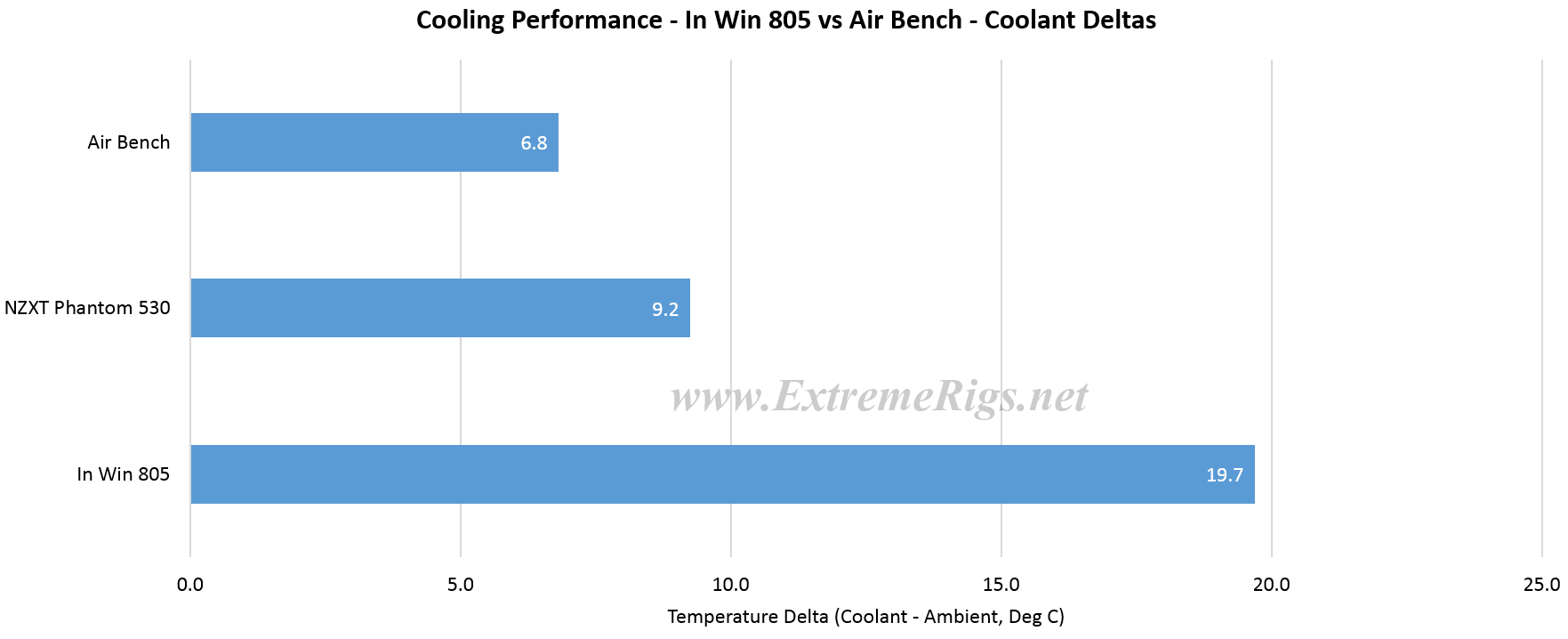
So clearly things are not as happy as we’d like, but air temperatures only give an idea of how things translate into actual cooling of the CPU. Let’s next look at the coolant delta i.e. how well does the radiator do when fed with that air. Now that we’ve seen how the data settles let’s simplify the plots and focus on the average of the third hour from each data set:

Coolant at about 7C over ambient seems reasonable for a thin 240 radiator with one bank of fans. The Phantom was setup with the same 240 radiator exhausting out the top while the intake to the case was the supplied 200mm fan mounted in the front. Therefore it was receiving air warmed by the motherboard rather than fresh ambient air. The In Win of course used the supplied 240mm rad mount with the fans in push. The only chassis fan was the supplied In Win exhaust fan. That fan is quite low RPM ~1200 and can’t really handle maintaining enough airflow through the case to keep temperatures down.
Coolants are of course far higher relative to ambient – nearly 20C now instead of 7C. Coolant this high can be a concern because tube becomes more elastic meaning it can lose it’s grip on a barb. Tube also ages faster at higher tempertatures and will need replacing more often. It’s quite essential to have some form of lockring i.e. a compression fitting or a worm clamp to make sure that tube will not come loose when running such high coolant temperatures.
Lastly let’s take a look at the resultant effect on the CPU temperatures:

As expected the coolant almost linearly adds to the CPU temperaure. As we are running a stock CPU here then we have plenty of room for temperatures to grow, but such a delta might limit your overclocking simply because the CPU would get too hot.
Summary
So the In Win 805 is a beautiful mid tower case made out of glass and aluminum. It retails at $200 and has convenient and easy mounts for radiators and “all in one” coolers. It’s the first case we’ve had that also had USB 3.1 on the front panel.
For a mid tower then it’s expensive, but it ticks all the boxes. The only real concern is the temperatures. Our stock 5820K ran 11C hotter than an NZXT case when placed in this chassis. It is a case that should only be considered more for lower power builds – something like a 6700K & GTX 980 or Fury Nano combo would be ideal. Certainly don’t expect a 5960X + Quad 980 TI’s to be a good match – there would be considerable thermal throttling. We’d also highly recommend mounting ~2000RPM fans on both the bottom chassis intake as well as replacing the default exhaust fan that is included. The low speed exhaust fan on it’s own simply wasn’t capable of handling the heat of a loaded 5820K CPU. In Win could also help the temperatures by ventilating the top panel and adding fan mounts though this would ruin the clean lines of the chassis. In addition the radiator mount could have also been compatible with a 360 radiator – this seems to have been one of the more common mods done to this case and it wouldn’t have been hard to do.
Summary – Bronze Award
Apart from the thermals it was hard to fault anything else about the design. The most we could come up with was that some of the wires were not black though the sleeve did a decent job of hiding it. Extra radiator mounts would have been great but then the case would have been bigger. USB 3.1 is a great inclusion as well. A reverse ATX option with a top window would have been nice too.
Overall the 805 is a great case for those looking for something stylish and who aren’t worried about cooling or of course the price. The magnitude of the thermal problem is really why it dropped to a bronze award.





[…] In Win 805 Case Review […]
I’m having the same issues with this case, the air flow is absolutely shocking. I had to underclock my i5 4670k from 4.6Ghz down to 4.2Ghz to get acceptable temperatures. I don’t know why In Win didn’t bother putting any airflow under the PSU as all it does is exhaust into the GPU, causing it to run hot also. Also with the HDD bays, they could have designed the case with more clearance underneath the bays so that you could still run 2 fans of the bottom of the case, or atleast even 1 fan with the bays still in. If you want to run 2 fans on the bottom of the case then you must remove the HDD bays, which means you can’t mount any HDDs. I just don’t get it, why bother making a case look so amazing but then skipping out on the design performance wise. I’m thinking I will add ventilation under the PSU then drill holes so that it can be mounted the right way up. But creating ventilation to the front of the case will be hard as I’m not willing to mess around with the glass at all.
I have a 4670k @ 4.5 ghz running at 61c after 4 hrs. full load paired with gtx 770. These temps are more than acceptable. also the fan on the psu is exauhst not intake (not blowing anything on on your gpu. I use rear mounted push pull corsair h80i for cpu cooling and titanx reference cooler on gpu. Two 140mm fans mounted in front of case for circulation, no bottom intake fans. granted this is a low power rig, but the case is not as bad as you make out. If your worried about the cost of a few fans to add in, you should not have purchased a 200 dollar case.
PSU acts as a second rear exhaust fan, it extracts air out of the case! Corsair CPU water cooler H105 240 mm radiator/fan assembly mounted at front of case sucks air up from large filtered intake at bottom. EVGA water cooled GTX 980Ti Hybrid radiator/fan replaces rear top fan. This configuration keeps everything super cool …
You can put 4 rubber spacers 1/8 between the case and the glass front panel (front panel is held in with 4 screws). That way the front fans will suck in fresh air, its a small gap but a gap none the less. Without that small mod you really need to place atleast 1 fan in the bottom of the case. Also just mod a little so you can mount the bottom fans with the hdd case. Yes i agree its a shame but if you take the extra time you will have a case like no one else!.
PSU acts as a second rear exhaust fan, it extracts air out of the case! Corsair CPU water cooler H105 240 mm radiator/fan assembly mounted at front of case sucks air up from large filtered intake at bottom. EVGA water cooled GTX 980Ti Hybrid radiator/fan replaces rear top fan. This configuration keeps everything super cool …
Hey, this was a sweet review. I am wondering what parts you used for the cooling system? I am planning on copying your cooling setup. Let me know, thanks.
Awesome review! What are all of the parts you used for the cooling? I want to copy your cooling on my build with the In Win 805.
On the 805 I used an EK Supremacy MX cpu block, EK’s 3/8 x 5/8 compression fittings and their clear tube, an EK DDC 140 reservoir pump combo and an EK PE radiator. It’s very similar to this kit: https://www.ekwb.com/shop/ek-kit-l240-1 with the exception that I’m using a 140 res vs a 100 and I’m also using the universal mount to mount the pump to the radiator 🙂
If you are only doing a cpu loop then an AIO like the EK predator or Swiftech H220x might be a good choice also for the 805.
What did you do for setting up the loop on this build with the kit you used besides the small changes?
Last question, where did you get the universal mount for mounting the pump to the radiator?
Sweet, thanks for listing the parts and similar kits. Also thanks for the reply too.
Comments are closed.