





Introduction
Alphacool NexXxos GPX GTX 980 M02 with Backplate Review – Alphacool’s GTX 980 Upgradeable Water Block & Backplate
In this review we’ll be taking a look at Alphacool’s after market watercooling block for the NVidia’s GTX 980 reference card – the “NexXxos GPX GTX 980 M02”. This is part of our GTX 980 water block round up. As always a big thanks to AquaTuning for supporting ExtremeRigs with a test sample.

Alphacool have quite a few different versions of their NexXxos GPX GTX 980 – the M02 is the one that fitted our reference card. As we had reviewed the R9-290x version before – we were sent an upgrade kit. Wait – you might be asking – an upgrade kit?
Yes – you see Alphacool unlike everyone else has moved away from a traditional full cover GPU block to a hybrid that uses a reusable core cooling block attached to a metal plate that then cools VRM and memory. This will be easier to understand when you see the block. So let’s get it unboxed:
 Opening the box first reveals the backplate which is wrapped in plastic but is otherwise unprotected. Luckily as a thick piece of aluminum it’s unlikely to get damaged. Underneath the next fold of cardboard is the rest of the upgrade kit:

The two metal plates have a matching ribbed theme that is more functional than aesthetically pleasing: Underneath there some machining work going on for the front plate while the backplate is almost untouched:
 The instructions told us to remove the block from our existing installation and to apply TIM around the corners in order to thermally couple the block to the front plate. The block was secured with the 9 black screws shown below:

There was plenty of TIM to ensure a good connection to the front plate – it has to be said though that the front plate will have it’s own cooling effect by the airflow in the case as it’s quite a heatsink itself: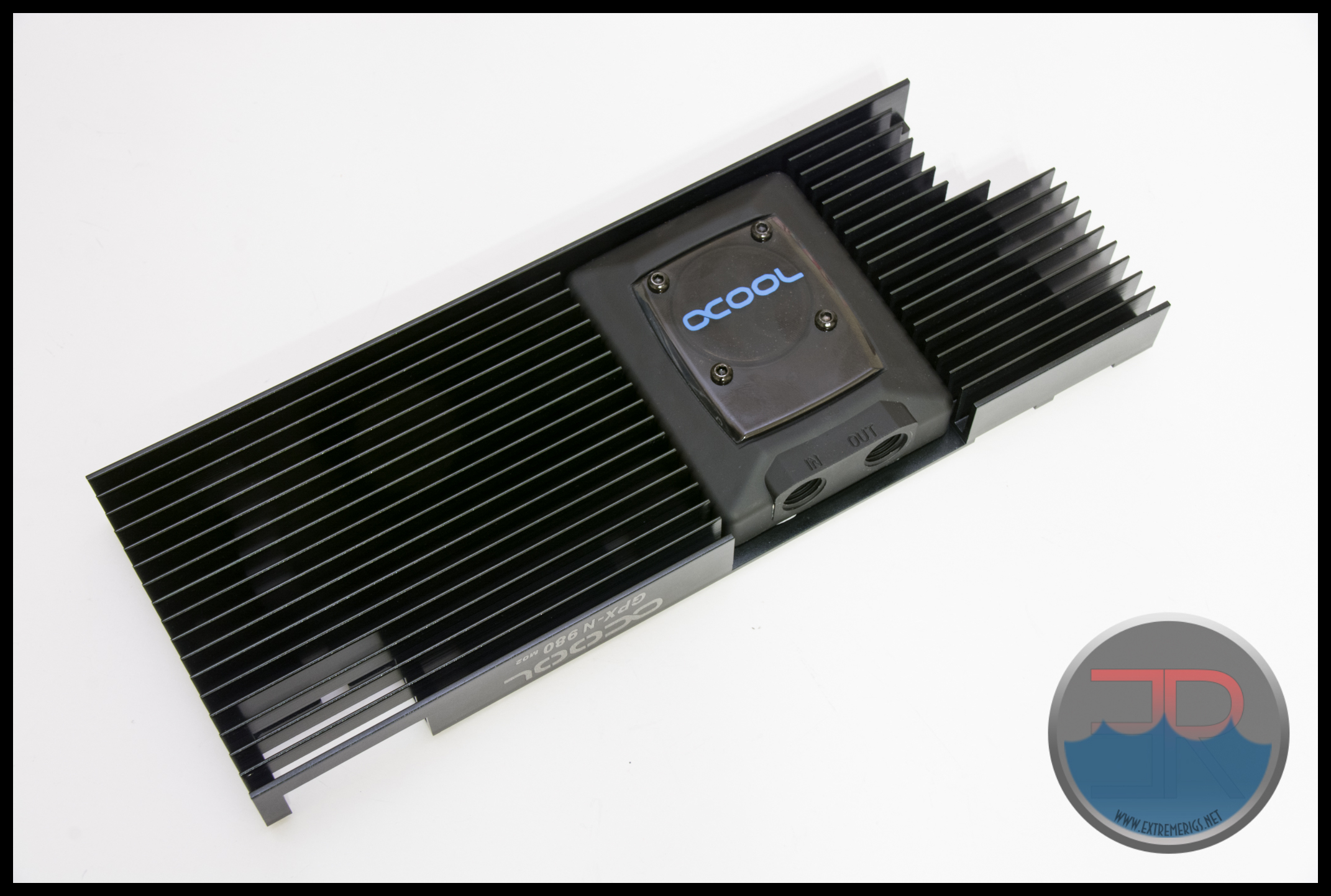
The block is directional unlike most of the competition and only has one port option for each input and output:
 The ports are also recessed somewhat from the edge of the plate so that larger fittings may need extensions to work. It’s also noticeable that this is the only block without the option to connect at a right angle which certainly helps with most tube routing.
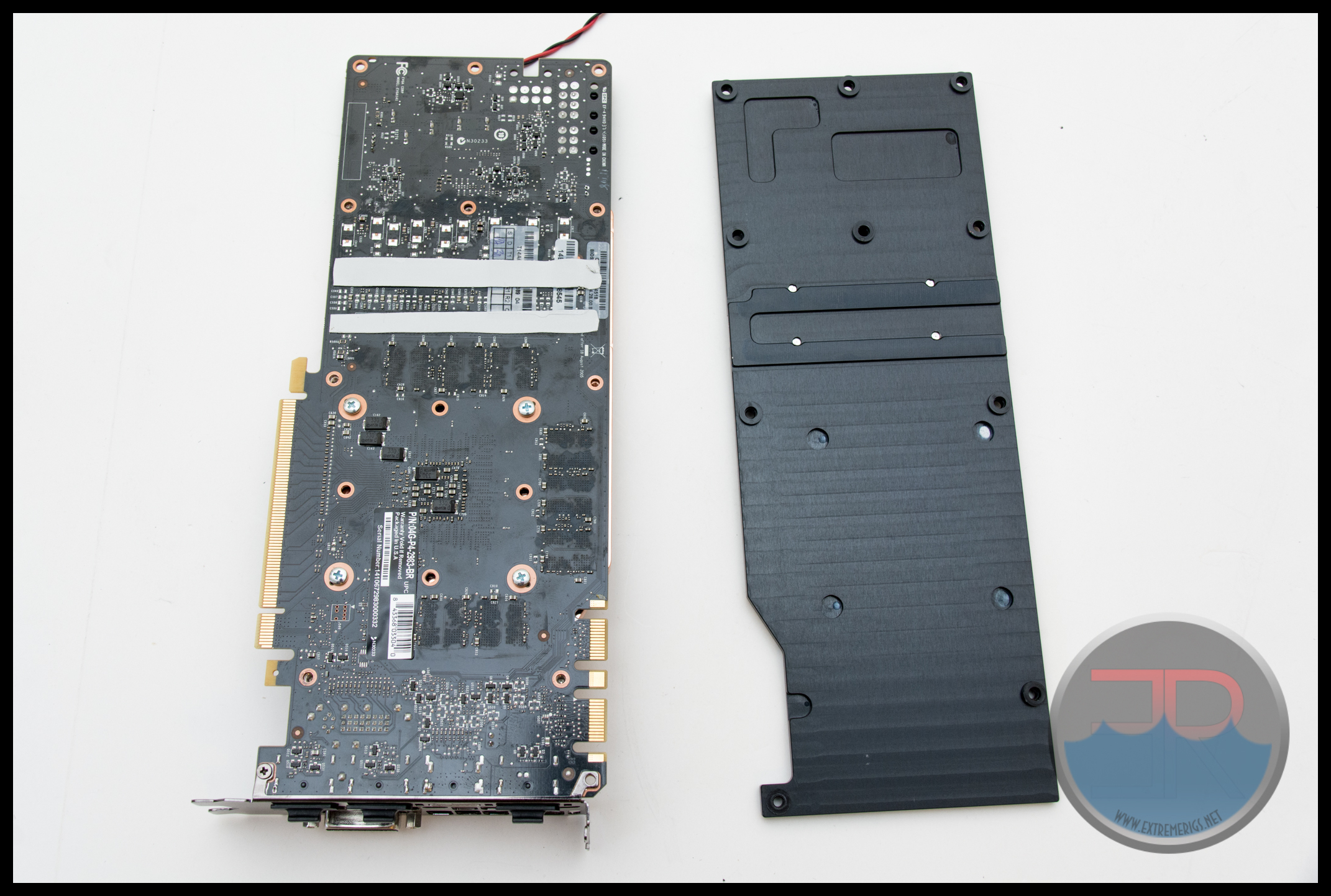
Now to fit the block to the PCB. First up was to mount the many, thick, thermal pads, this part was tedious but well described. As can be seen in this photo after the block was removed – there are quite a lot!

The thermal pads on the backplate in particular are still huge:

The instructions were less clear about how to install the block and backplate. In the end we figured out that the low profile black screws were meant for the not low profile section of the backplate. While the taller button head dark silver screws were meant to drop through the backplate and secure the PCB to the front plate only. It was strange that two colors of screws were used let alone that low profile screws were used where they may not be needed anymore. In addition the low profile screws used a small allen key that was easy to strip. The metal used in the screws felt on the cheap and soft side and the paint job on them filled in the heads of some of the screws. This is not the first time we’ve been disappointed in Alphacool’s choice of screws. Hopefully this will be improved next time. 
One thing that did get improved was the design of the backplate to be more compatible with Asus motherboards. As can be seen part of the backplate has none of the “ribbing” and this means it now fits in both the Rampage IV Extreme and Maximus VI Impact that it failed to fit into for the R9-290x version!
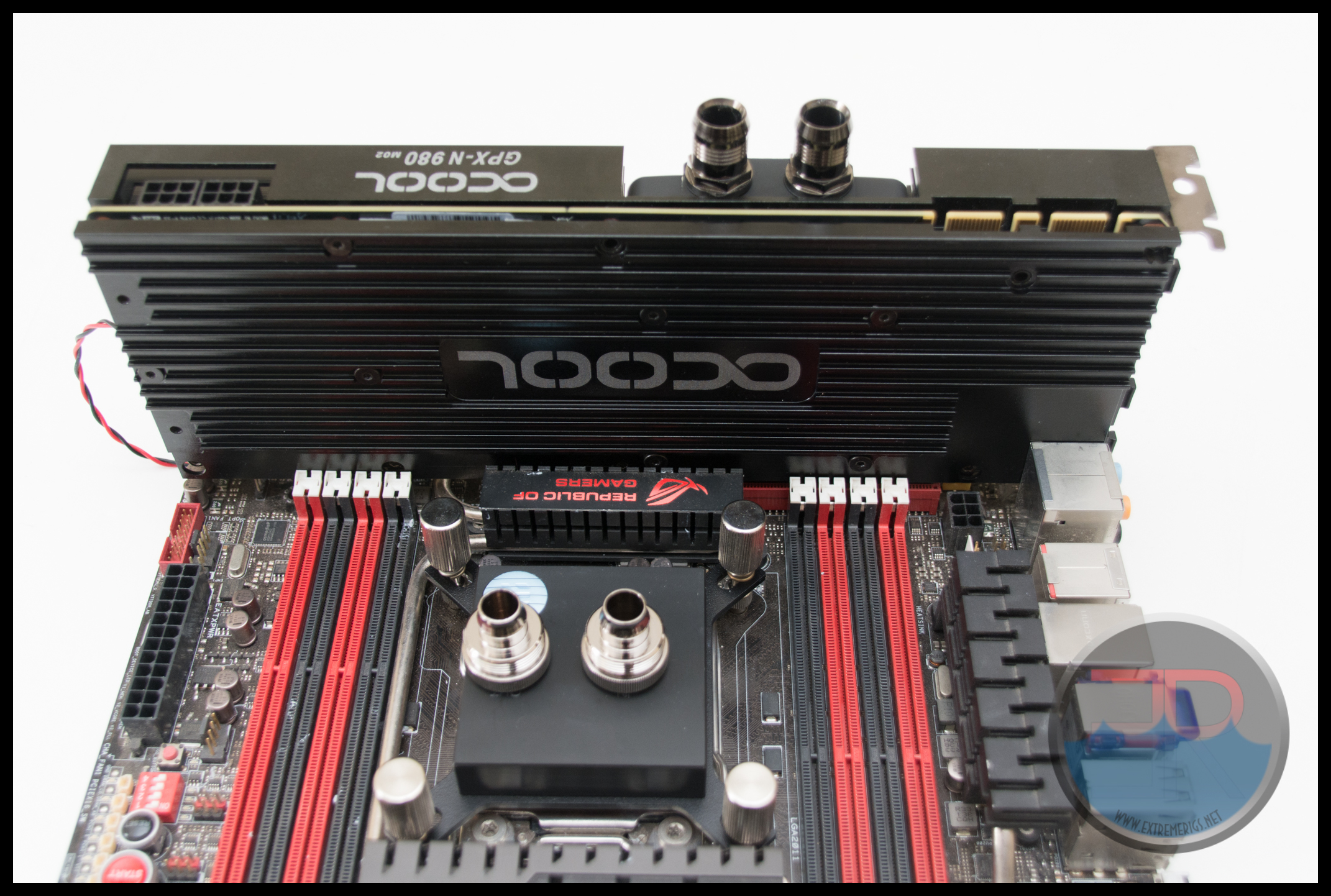
 Having said this – the backplate is still very thick and when combined with the choice to use very thick thermal pads then the end result is still quite fat:
 While Alphacool made it so that multiple of these cards can be stacked together for quad SLI, it’s not so compatible with something taking up the full space of a PCI slot behind it:
 So while compatibility has been vastly improved it is still not perfect!
Now let’s take the block apart…
Internals
Now let’s take the block apart:
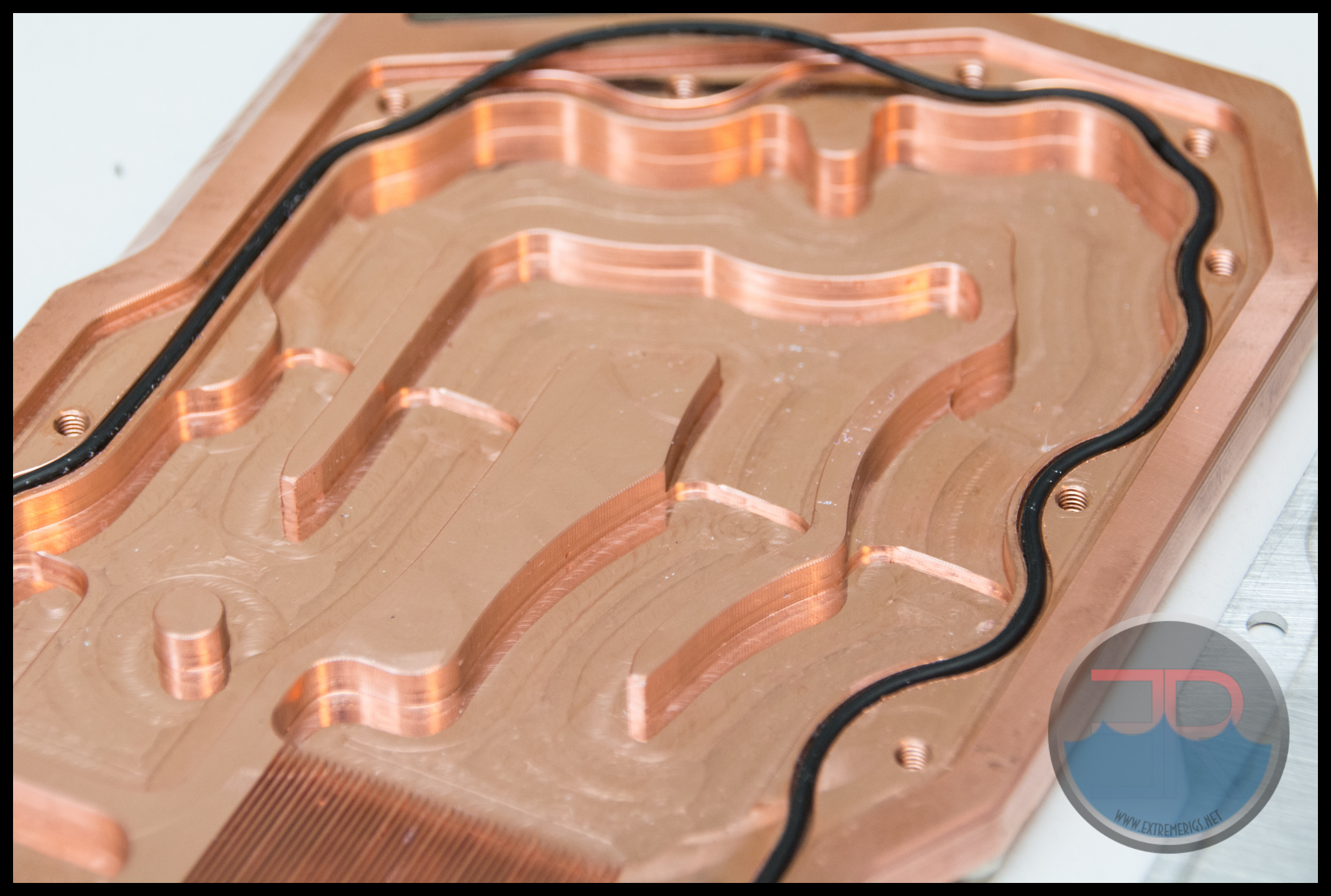
 The main cooling engine itself is on a separate plate to the one that the large front aluminum plate attaches to. This means that the VRM and memory won’t benefit from it, but also that the core doesn’t really get warmed up by them either. While we can see discoloration of the plated copper, we don’t really see any flaking. As mentioned this is the same core as used in the R9-290 so we expect to see similar thermal performance but also similar restriction.
Flow Rate Testing
If you don’t know how to read a pressure/flow plot then check out our guide. Testing was done by hooking up the block under test to a water faucet/tap and varying flow through it. Flow was measured using a 5GPM King Instruments Rotameter, and pressure across the block was measured using a Dwyer differential manometer. A Koolance CPU-380 block is also used here as a reference point:

It can be seen that all but two of the blocks have similarly low restriction. Alphacool’s block has the worst restriction by far. At 1GPM it has over 4.5PSI of back pressure. This is really really high. In other words adding this block in your loop *will* effect your flow rate negatively. The cooling performance of your radiators might suffer and the cooling performance of your CPU block may also suffer. The money you might save buying this may be necessary to apply towards a second pump in order to run it at a decent flow rate.
Onwards to thermal performance!
Thermal Testing
For thermal performance the GTX980 was tested on our thermal bench. This consisted of a 4930K on a Rampage IV Gene motherboard running Windows 7 on a Samsung 840 Pro SSD. Power was provided by a Corsair AX1200. Memory was GSkill 4x8GB 1866-CL11. Thermal monitoring was provided by an Aquaero 6. Temperatures of the Aquaero sensors and GPU sensors were logged by HWInfo. 347.52 WHQL Drivers were used. MSI Afterburner was used to downclock the GPU to a miserable 1151MHz. Furmark was used to load the GPU at 118% of it’s power limit (121% is the maximum power the card can draw). Furmark is used in the higher power burn mode to give a very consistent load over time. This is far more consistent than running Valley for example where GPU load is not as constant as it could be.
In previous water block reviews for GPUs we’ve flashed a modified bios to the GPU to enable us to achieve a higher power limit and test the card at higher power. These readily available bioses were used by many enthusiasts and so we felt it was a “fair” setup. However for the GTX980 there is currently no bios for the reference card that enables this. For this reason we are stuck with NVidia’s absurdly low power limit. The only way to get around this currently is to modify the PCB itself which we think many enthusiasts will not be willing to do. Therefore, likewise we did not do this. This means that the power used (and therefore cooled) by the GPU is so low that a waterblock is not necessary. EVGA’s ACX cooler ran almost silently under the same load and the GPU remained at a moderate 40C over ambient.
This also means that the GPU temperatures with a waterblock are so low that the relative margin of error is huge. To combat the error we measure across seven different flow points – this also give us insight to how the cooling responds with flow. In previous GPU block reviews we’ve also lost a *lot* of GPUs. Installing multiple blocks multiple times coupled with high power levels can quickly kill a card. Because of this we stick to one mount of the block on the GPU. This means that the test data is susceptible to a poor mount. However the TIM used (arctic cooling MX2 – not the included TIM with the block which may be good or bad) is inspected to ensure a good spread. If a good spread is not achieved an immediate re mount is done.
To further reduce errors the core temperature is measured relative to the coolant. Air temperatures are not measured because they are so prone to error. Ambient temperatures are not controlled and are another source of error. As NVidia do not give us access to VRM temperatures a temperature probe is mounted to the PCB in the middle of the VRM section. It should be noted that actual on silicon temperatures will of course be worse than this probe which is not well insulated from the block’s cooling.

Contact pressure was good and TIM spread was ok.
The thermal pad on the back of the GPU core definitely gets the most squashed!
Core Cooling
The GPU core itself generates the most heat of course and we were excited to see how Aqua Computer performed. As expected performance still increases across the flow range of interest:
 Here we can see that Alphacool is significantly better on temperatures than the competition. Now this plot can make restrictive blocks look better so you really have to be comparing each data point to each data point despite the drop in flow. This was a surprise even though Alphacool led the results on the R9-290. We expected EK’s new design to be more competitive. Afterall the Alphacool is nearly 2C better which percentage wise is huge. This means that while Alphacool is incredibly restrictive, that restriction is at least being used to get great temperatures.
TIM
Traditionally I’ve only looked at block performance with MX2 TIM, however manufacturers generally supply TIM with the block and so this time I decided to test that.
 This testing allowed 4 hours for TIM burn in which is simply not enough for some TIMs. However we now see that Koolance, EK and XSPC are all essentially the same when using their own TIM. Swiftech and Alphacool have TIM that is either horrible or has a long curing time. Given the low power nature of the GTX980, we suspect it’s simply a long curing time.
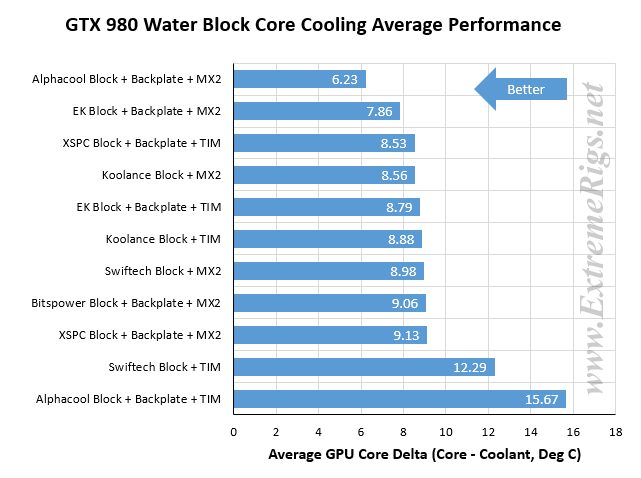
We can then compile all these data points into averages which should take some of the error out:

Here we can see that 9/11 data points are within 0.5C. This along with the low absolute values shows just how overkill water cooling really is for a low power GPU like the GTX980.
Alphacool when using our own MX2 performed amazingly well. The supplied TIM however failed to perform in this test.
VRM Cooling
While AMD give us access to a temperature probe built into the VRM section Nvidia does not. Our probe was therefore inserted between a thermal pad and the body of a VRM IC located in the middle of the VRM area. Because it measures IC case temperature and has a thermal pad touching it the temperatures will be significantly lower than the internal silicon temperatures of the IC.
 Coolant flow has a weak effect on VRM temps, particularly for blocks with poor performance. Let’s therefore average this to see relative performance more clearly:
 Alphacool by design have compromised on VRM cooling. They do not have a full cover block, in addition the thermal connection from coolant to the aluminum plate covering the VRMs is weak. Then on top of that Alphacool use thick thermal pads. It’s no surprise then that Alphacool are the worst on this metric. What’s surprising is that Swiftech is almost as bad. Having said this a 21C delta is low enough that there are no concerns with VRMs dying so despite being relatively bad they are still “acceptable”.
Onwards for the summary!
Summary
Core Cooling Performance – 5/5
Alphacool makes a strong statement here beating their nearest competition by nearly 2C
VRM Cooling Performance – 2.5/5
While the VRM performance is acceptable, Alphacool are significantly behind.
Restriction – 1/5
The amount of restriction is so high that flow rates will be significantly impacted by this block and a 2nd pump may be necessary to run at more optimal flow rates for system level cooling efficiency.
Supplied TIM – 2/5
The supplied TIM performed the worst out of any tested. However there was at least some included.
Mounting Hardware – 2.5/5
One screw head was so full of paint that we could not use it. The two types of screws were of different colors and required different sized allen keys to tighten. The metal was soft and easily stripped.
Backplate – 3.5/5
Compatability has been vastly improved on the backplate however it’s still massively thick. I do wonder whether it’s really doing anything given the thickness of the thermal pads.
Aesthetics – 3.5/5
The heatsink style look of the aluminum plates is industrial and functional. But the real let down is the core block itself. The plastic is almost a dirty grey rather than black, and the plastic top with logo still looks a bit cheap.
Quality – 3.5/5
Nothing screamed high quality, but the only real let down was the mounting hardware itself.

Summary
Exceptional core cooling performance but at the cost of extremely high restriction and poor VRM cooling. In addition the cost savings of an upgradable block may be wiped out by the need to add a 2nd pump. The mounting hardware was disappointing but the big plus this time around was the massively improved compatability. While this version still isn’t perfect Alphacool are on the right path to improving it. Hopefully the next generation will fix the remaining problems!
Where to buy: AquaTuning – Upgrade kit with Core Cooler – $48, Full Product including core cooler and backplate – $94




[…] Alphacool NexXxos GPX GTX 980 M02 with Backplate Review […]
I have a pump with ~600l/h and ~3m head pressure. I have 240 and 360mm radiators and Heatkiller III Acetal on my 4670k. Will i be ok with this GPX block? Only Alphacool has block for my card, so i’m worried if my pump is enough.
[…] waterblock for the core and what is essentially giant heatsinks for the VRM and VRAM. Review here. Alphacool NexXxos GPX GTX 980 M02 with Backplate Review – ExtremeRigs.net 2. EK Thermosphere, which is a universal block. You'll need to modify the stock G80 mounting […]
Comments are closed.